Gheenie: A Script Font for Web Design
When I was redesigning a boutique online store, I needed a font that felt personal and elegant. Gheenie, a script font from the Script Amp collection, caught my eye. It has that handwritten charm without feeling too casual. As a web designer, I always look for fonts that add character but still work well in digital layouts.
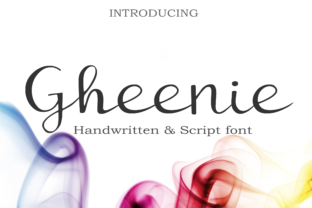
Gheenie is a monoline script, which means it has consistent stroke widths throughout each letter. This makes it clean and modern while still retaining a handcrafted feel. The font feels familiar, like a friendly signature, but with a fresh twist that stands out on a website.
Testing Gheenie in a Real Layout
I started by testing Gheenie in the hero section of the online store. The headline needed to grab attention but also feel approachable. Using Gheenie for the main title gave the page a warm, inviting tone. It worked especially well over a soft background image, where its curves added visual interest without overwhelming the design.
Next, I tried it on a mobile layout. On smaller screens, readability is key. Gheenie held up surprisingly well, especially at larger sizes. But I noticed that when used in smaller text, like buttons or captions, the details could get lost. That made me think about how best to use the font in different parts of the site.
Where Gheenie Shines
Gheenie is ideal for headings, logos, and short phrases. It works great as a logo font or for creative portfolio sites where personality matters. For the online store, I used it for the brand name and a few key headlines. It added a touch of sophistication that matched the brand’s aesthetic.
It also pairs well with simpler fonts. I paired Gheenie with a clean sans serif for body text. The contrast made the design feel balanced—Gheenie added flair, while the sans serif kept things readable and professional. This kind of font pairing is common in editorial design and helps create a clear visual hierarchy.
Readability Considerations
When using Gheenie on a website, it's important to consider how it will look across different devices. On desktop, it’s fine for large headings, but on mobile, I recommend keeping it to bigger sizes. If you're using it on dark backgrounds or image overlays, make sure there's enough contrast so the text remains legible.
For small buttons or call-to-action areas, I’d suggest using a more straightforward font. Gheenie can be decorative, but it’s not the best choice for long blocks of text. Instead, use it as an accent or for short, impactful messages.
Using Gheenie in Different Projects
Whether it's a coaching website, a product landing page, or a blog header, Gheenie can bring a unique personality to your design. I've used it for a course sales page where the headline needed to feel personal and trustworthy. It helped establish a connection with the audience without being too informal.
Another time, I used Gheenie for a promotional landing page. The font’s flowing lines complemented the imagery and created a cohesive look. It felt like part of the story rather than just a typeface. That’s the power of a good script font—it can enhance the overall experience of a website.
Font Pairing and Design Assets
If you're working on a digital brand kit, Gheenie can be a strong centerpiece. Pair it with a serif or sans serif font to create balance. For example, a serif font might work well for body copy, while Gheenie handles the headings. This kind of pairing is common in packaging design and editorial projects.
Before using Gheenie on a website, check the available styles, weights, and file formats. Make sure it supports the languages you need and that the commercial licensing fits your project. These details matter, especially if you're working on client websites or online stores.
Final Thoughts on Gheenie
Gheenie is a versatile script font that adds a personal touch to any digital project. Its clean, monoline structure makes it easy to work with, while its handwriting-inspired style gives it character. Whether you're building a creative portfolio, a coaching website, or an online store, Gheenie can help elevate your brand’s visual identity.
As a web designer, I appreciate fonts that are both beautiful and functional. Gheenie checks both boxes. It’s a great addition to any design toolkit, especially for those looking to add a human element to their digital work.
With careful use, Gheenie can transform a simple layout into something more memorable. Just remember to test it in different contexts and pair it wisely. That way, you’ll get the most out of this premium font and create a more polished online brand experience.